
Site access tokens
Send a secret header only to origins you list, so your own staging WAF or CAPTCHA can allow QA traffic and your form backend can tag it as test leads.
Last updated
A site access token is a secret header you define that the app sends only to the exact origins you list, so your own WAF, CAPTCHA or fraud scoring can recognize and allow your QA traffic.
When to use them
If your own site's bot protection (Cloudflare or Akamai WAF rules, reCAPTCHA, Turnstile or hCaptcha, internal fraud scoring) blocks your QA runs, do not try to get past it. Allowlist your test traffic on that site instead.
A site access token is a header such as X-QA-Access: <long random value> that your site or WAF accepts as "this is our QA traffic".
Note: This is an allowlisting feature for sites you own or are contracted to test, configured with the site owner's agreement on the site itself. It is not an evasion feature. It cannot change the user agent, cookies, client IP or any browser-controlled header, and it sends nothing to sites you did not list. The project does not provide, and will not accept, features for bypassing bot detection, CAPTCHA or fraud controls of anyone's site. See the Acceptable use policy.
Use tokens together with synthetic test data, and tag every submission that carries the header as a test lead so it is never sold, billed or counted. Do not use them to create fake leads. Lead-form teams can combine tokens with consent QA on staging.
Set up a token
Open Settings → Advanced → Site access tokens and click Add Token.
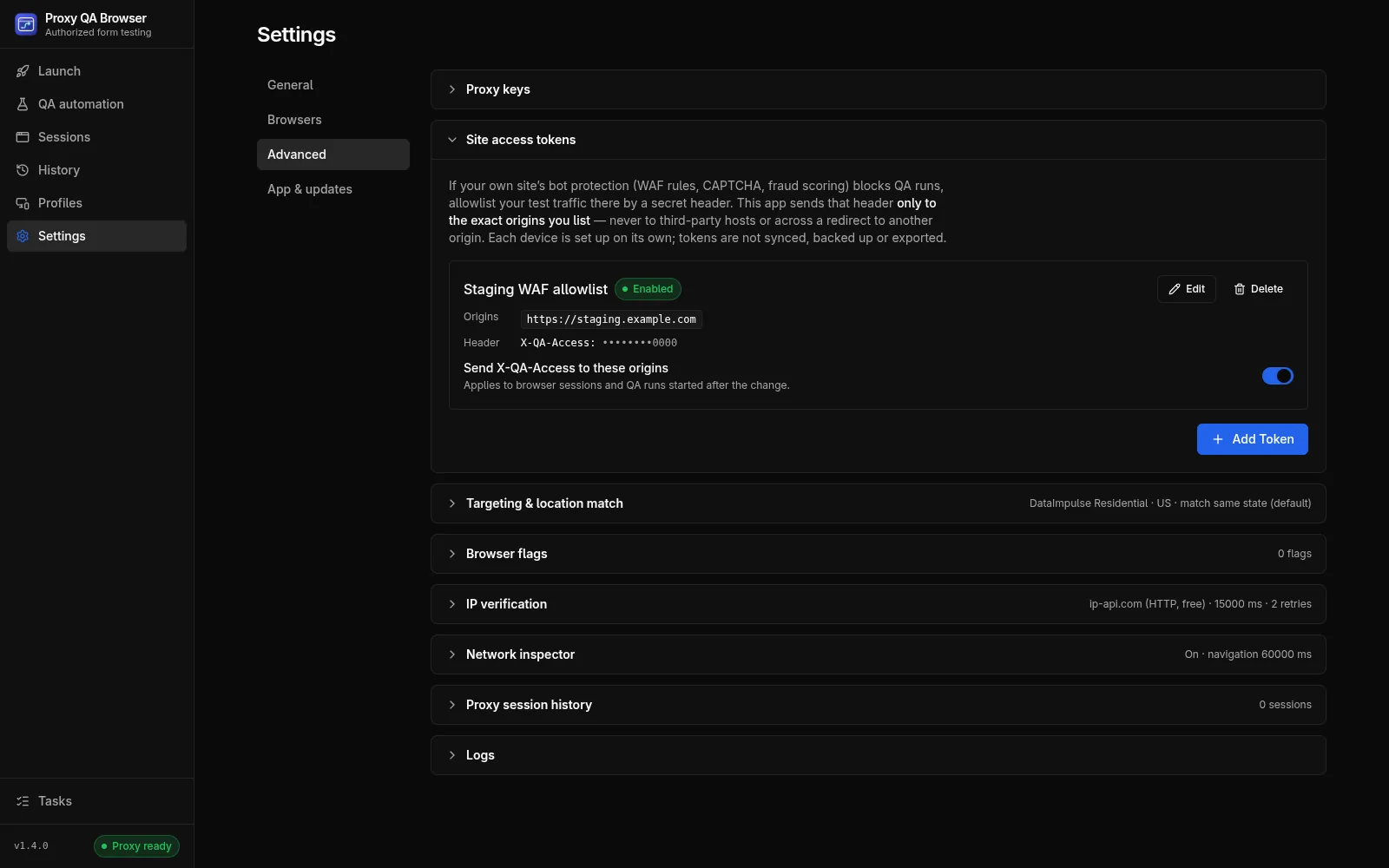
| Field | Rules |
|---|---|
| Name | Free text, shown in lists and in evidence |
| Origins | 1–20 exact origins, one per line: scheme, host and port, for example https://staging.example.com or https://staging.example.com:8443. HTTPS only; plain HTTP only for localhost, 127.0.0.1 and [::1]. No wildcards, subdomains or paths. Case, IDN (punycode) and default ports are normalized |
| Header name | An HTTP token such as X-QA-Access. Refused: Host, Cookie, Authorization, Proxy-Authorization, Content-Length, Content-Type, Origin, Referer, User-Agent, connection headers, every Sec-*, Proxy-* and X-Forwarded-* header, and client-IP headers (Forwarded, X-Real-IP, True-Client-IP, CF-Connecting-IP) |
| Secret value | 1–4096 printable ASCII characters. Write-only: after saving, the app shows only •••••••• plus the last 4 characters of a value of 16 or more characters. Editing without a new value keeps the saved one |
| Enabled | Only enabled tokens are applied |
Two tokens may not send the same header name to the same origin; this is refused when you save. Changes apply to browser sessions and QA runs started afterwards. Use Edit and Delete (with confirmation) to manage tokens.
Configure your site
On your staging or QA environment:
- Add a WAF rule that skips bot and challenge rules only when the header matches the secret and the host is your staging host. On Cloudflare, use WAF custom rules with the Skip action; on Akamai, a request-header match in a security-policy exception. Rotate the value like any other secret.
- On your staging site, use your CAPTCHA vendor's test keys (for example reCAPTCHA test keys, Cloudflare Turnstile testing dummy keys or hCaptcha test keys) instead of solving challenges.
- Tag every submission that carries the header as a test lead in your form backend, so it is never sold, billed, routed to sales or counted in metrics.
What is sent where
- Exact origin only. A request gets the header only when its own origin (scheme, host and port) is in the list. Third-party scripts, images, APIs and analytics on the same page never get it.
- Redirects never carry it to another origin. For tokenized requests the app performs the request itself, through the same proxy and cookie jar, with redirects disabled. A page redirect becomes a fresh navigation to the new URL, which gets the header only if that origin is listed (so
POST /submit → 303 /thankson your site keeps it). A 307 or 308 redirect of a form POST is blocked, because the body cannot be re-sent safely. A sub-resource redirect is followed by Chromium and Firefox without the header; WebKit cannot do that, so there the sub-resource fails instead. - File uploads to a listed origin work on every engine. On listed pages only, the app keeps the files you pick in
<input type=file>in memory for that browser session (up to 25 MB each, 50 MB in total) and sends them with the upload. If the bytes are not available (a larger file, or a form on another site posting to the listed origin), the upload is blocked rather than sent as an empty file, and the reason is written to the app log. Files are never read on other sites. - Not covered (the header is simply absent): requests answered by a service worker, WebSockets, and the very first request of a pop-up in a QA run.
Side effects while a token is enabled:
- The HTTP cache of that browser context is disabled.
- Tokenized responses are buffered before the page sees them, so streaming and server-sent events from those origins do not stream.
- In Chromium, a page served this way counts as "public network" for Local Network Access, so it may need permission to call
localhostor private-network hosts on other origins.
Storage and evidence
- Tokens are stored per device in
<userData>/data/site-access-tokens.json(owner-only). Names, origins and header names are plain; the value is encrypted with the operating system keychain (Windows DPAPI, macOS Keychain, GNOME Keyring / libsecret or KWallet). Without a usable keychain (Linuxbasic_textor unknown backends), tokens can be neither saved nor applied. - Tokens are not synced, and not part of encrypted configuration backups, scenario or suite exports, or the CI runner. A file copied to another computer does not decrypt there; the list then shows Re-enter value.
- Every value is registered with the log redactor. Logs, reports and diagnostics never contain it.
- Runs record only the token name and the origin, for example
site access token "Staging" applied to https://staging.example.com: as an INFO log line for launches, and in the casenotesfor QA automation results. Never the value. - Playwright traces record raw request headers, so while any token is enabled a QA run skips its opt-in trace and notes "Trace capture skipped: site access tokens are enabled…".
In automation and CI
Enabled tokens apply to every QA automation run and to the recorder in the desktop app, with the same exact-origin and redirect rules.
The CI runner, its Docker image, the GitHub Action and the MCP server cannot use tokens, by design. In CI, allowlist the runner's traffic on your site instead, for example a staging environment that accepts the CI network, or test keys from your bot-protection vendor, configured on the site rather than in the manifest.
Common questions
How do I allowlist my own automated tests in my site's CAPTCHA?
On your staging site, use your CAPTCHA vendor's test keys, and add a WAF rule that skips challenges only when your secret header matches and the host is your staging host. Tag every submission carrying the header as a test lead. Tokens are sent only by desktop launches, QA automation runs and the recorder. For the CI runner, its Docker image, the GitHub Action and the MCP server, allowlist the runner's network on staging or use test keys.