
Visual regression testing against approved baselines, per browser, device and location.
Add a Compare screenshot step to a scenario and catch unintended visual changes on your own pages. Comparisons run locally in the free, open-source desktop app, and you approve every baseline yourself.
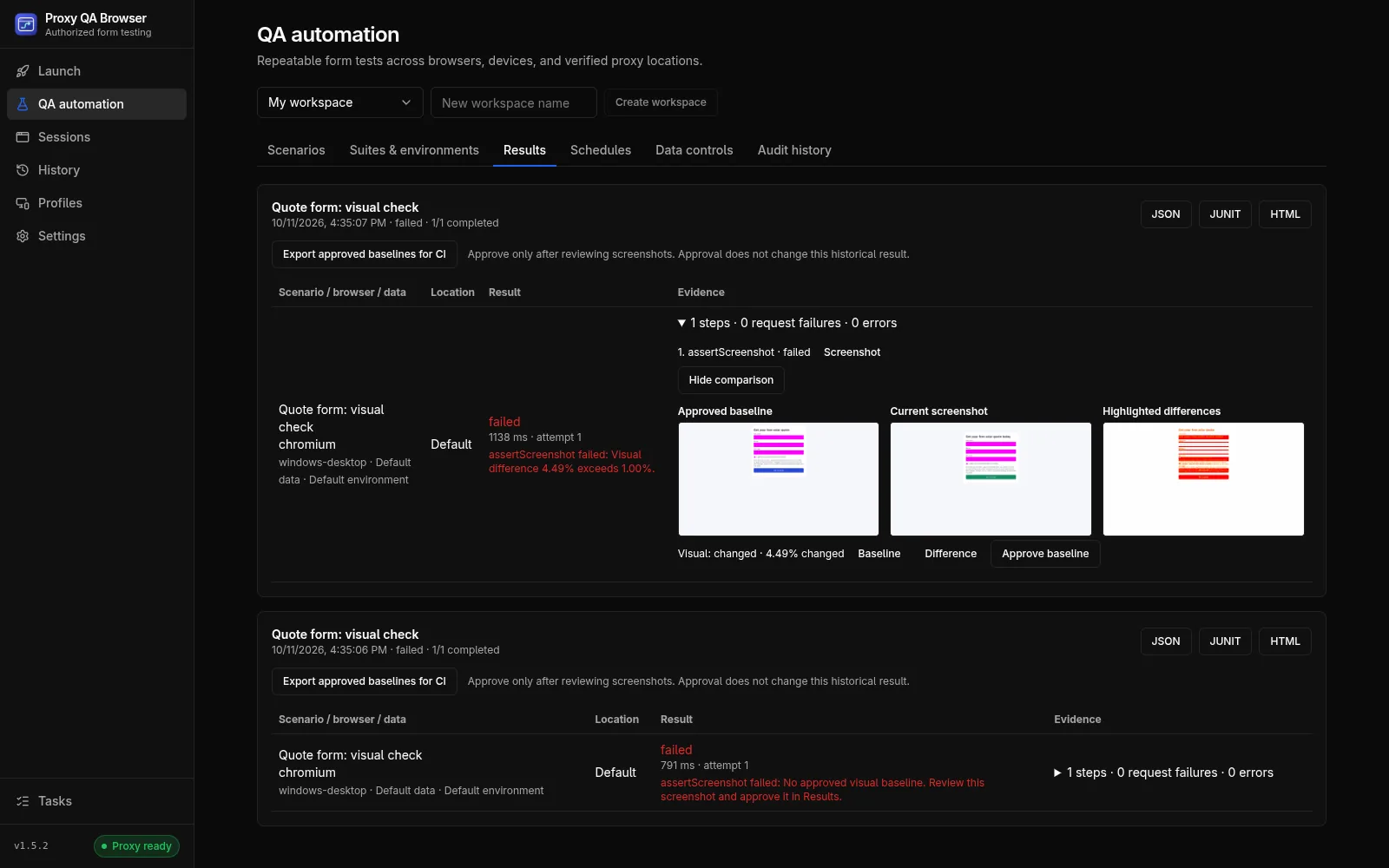
How a comparison works
A Compare screenshot step has a unique baseline name and an allowed difference ratio from 0 to 1; the default 0.01 allows 1% of the pixels to change. Screenshots disable animations and wait for fonts before they are taken. See the Compare screenshot step reference.
- Inputs, textareas, editable elements and [data-qa-sensitive] elements are masked by default
- Add CSS selectors to mask other changing content, such as dates or rotating banners
- A change in screenshot size always fails
You approve every baseline
The first run of a new step fails with No approved visual baseline. In Results, expand the case, choose View comparison, review the screenshot and click Approve baseline, then run again. Baselines are never approved automatically, and never by the CI runner.
Reviewing a change
When a later run differs by more than the allowed ratio, the case fails with the share that changed, for example 4.49% against 1.00%. View comparison shows the approved baseline, the current screenshot and the highlighted differences, so you can decide whether it is a bug or an intended change to approve.
One baseline for each browser, device and location
A baseline belongs to one combination of scenario, dataset row, screenshot name, masks, operating system, browser and version, device and viewport, locale and timezone, location and starting origin. One Compare screenshot step in a matrix of 2 browsers, 2 devices and 2 locations therefore keeps 8 separate baselines: baselines per browser catch rendering differences between engines, and baselines per device preset catch layouts that break at one viewport. Location cases need your own proxy plan.
Browser upgrades and other systems
The browser version and the operating system are part of a baseline, so after a browser upgrade, or on another operating system, the first comparison asks for a new approved baseline instead of reporting a false difference.
Visual checks in CI
Export approved baselines for CI writes a .qavb pack that the command-line runner, its Docker image and the GitHub Action can use. Approve baselines on the same operating system and browser versions the CI uses, for example in the Linux app with the same bundled engines; the runner image is published for linux/amd64. In CI, a missing or changed comparison is a test failure.
How it works.
Every step and setting is covered in the documentation linked below.
Read the docsBuild the scenario
Write the steps of your own page or form, or record the scenario first in a separate browser.
Add a Compare screenshot step
Give it a unique baseline name and keep the default 1% allowed difference, or set your own.
Run and approve
Run the matrix, review each new screenshot with View comparison and approve the baselines you accept.
Run again after changes
Later runs compare against the approved baselines and fail with highlighted differences when the page changes.
Export for CI
Export the approved baselines and the scenario, and run the same comparison in your pipeline.
Common questions.
Why does the first run of a screenshot step fail?
There is no approved baseline yet. Review the screenshot in Results, approve it, and run again; from then on, runs compare against it. Nothing is approved automatically. Results and reports
How do I stop dates or banners from failing the comparison?
Mask them. Inputs, textareas, editable elements and [data-qa-sensitive] elements are masked by default, and you can add CSS selectors for any other content that changes on every visit. Privacy of evidence
Can the CI runner approve baselines?
No. The runner only compares against an exported pack of baselines you approved in the desktop app. Missing or changed comparisons fail the run, with exit code 1. Outputs and exit codes
Try it on your own site.
Free and open source, for Windows, Linux and macOS. Use it on sites you own or are contracted to test.