
TCPA consent testing for your lead forms on emulated phones, tablets and desktops.
Proxy QA Browser checks that the consent disclosure on your own form is present, worded as approved, visible, at or above the font-size and contrast thresholds you set and close to the submit button, that the consent checkbox is not pre-checked, and that your lead-certificate script did its work. Every result comes with evidence you can export.
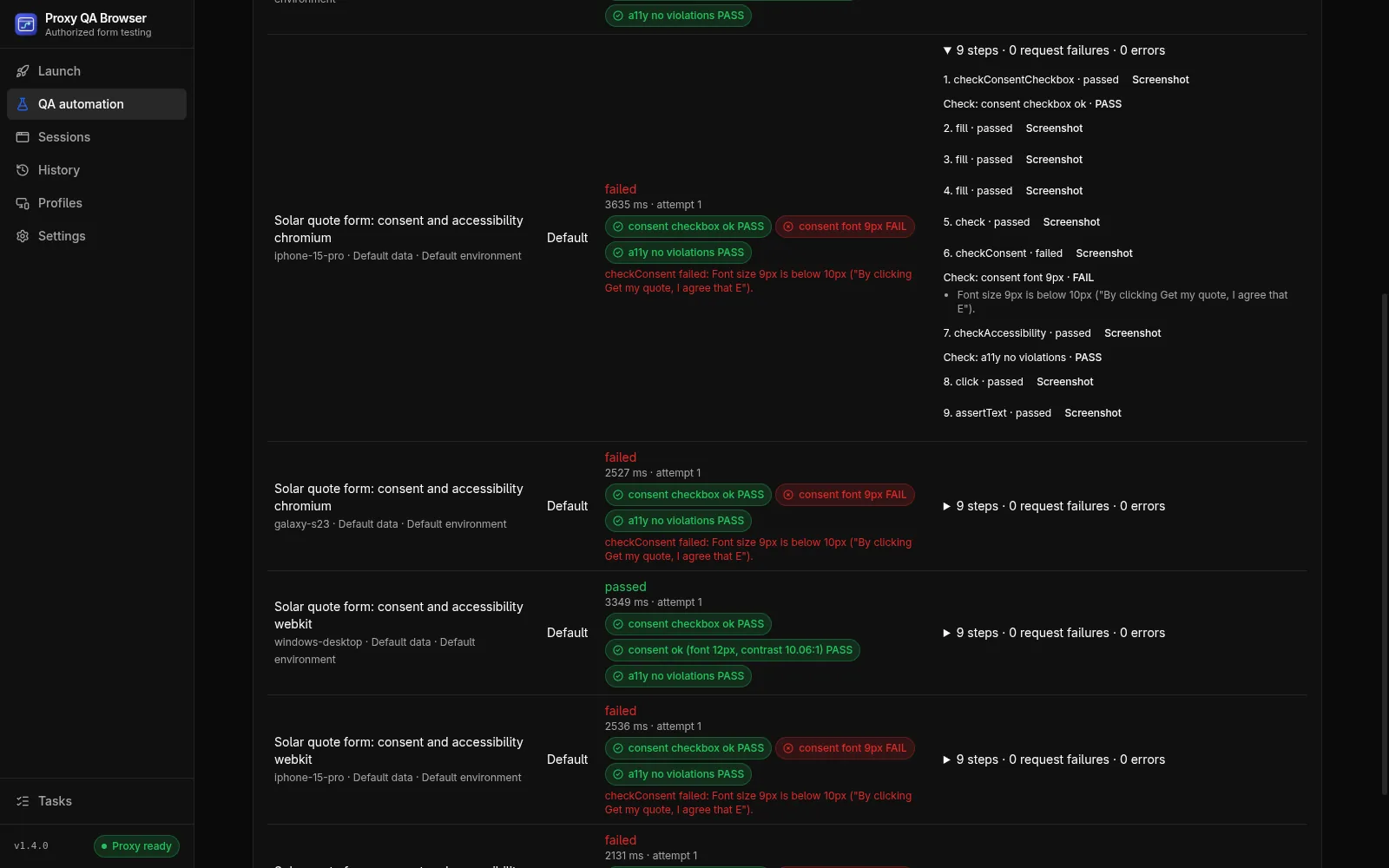
What the consent disclosure check verifies
The Check consent disclosure step finds the disclosure by CSS selector or by a distinctive phrase and runs up to six checks in order. It checks visibility, and measures font size, contrast and distance to the submit button against thresholds you set. Whether a disclosure is sufficient is a legal question for your counsel.
- Present: the block is found within the step timeout
- Wording: the rendered text matches your approved text, exactly or contained, with a word-level diff when it differs
- Visible: not hidden, clipped or covered by a modal, sticky footer or cookie banner; the covering element is named
- Font size: the smallest rendered text is at least your minimum (a configurable default of 10 px)
- Contrast: the lowest WCAG 2 contrast ratio is at least your minimum (a configurable default of 4.5:1)
- Near: the disclosure is within a set distance of the submit button (200 px by default)
Consent checkbox: not pre-checked and labelled
The Check consent checkbox step goes before any step that ticks the box. It fails when the box is already checked, when the element is not a checkbox, or when it has no label from a label element, aria-label, aria-labelledby or title: a rule you can require in your QA. A box that the HTML marks checked but a script unchecks is reported as a warning.
Lead-certificate script checks
The Check script loaded step waits for your page's own lead-certificate script to finish. The runner never calls these services itself, and the token or certificate value is never recorded, only whether it is populated and its length.
- TrustedForm: a script from api.trustedform.com loaded and the TrustedFormCertUrl input holds a certificate URL
- Jornaya LeadiD: a script from create.lidstatic.com loaded and the leadid_token input is populated
- Custom: a script URL pattern, plus an optional populated input or initialized global
TrustedForm, Jornaya and LeadiD are trademarks of their owners; this project is not affiliated with them.
State-specific wording with datasets
Put each state's approved disclosure in a dataset variable and use it as the approved text. Each dataset row runs separately and is named in results, and for location-dependent pages the same matrix can run from the states your campaign targets, with your own proxy plan.
One run reports every problem
With Continue if this check fails turned on, a failed check records its evidence, marks the case failed and lets the remaining steps run. Results show a summary of every failed or warning check above the matrix, such as "consent font 9px", a badge per check on each case and the evidence under each step.
- Accessibility (axe-core) and performance budgets can run in the same scenario
- JSON exports contain everything; JUnit adds a check property per check; the HTML report adds a Checks table
- Export the scenario for the CI runner, Docker image or GitHub Action
QA aids, not legal advice
These checks automate repeatable parts of consent QA. They are not legal advice and do not decide whether a disclosure is sufficient. Approved wording, placement rules and consent requirements come from your counsel. Run them against staging with synthetic test leads that your systems tag as tests.
How it works.
Every step and setting is covered in the documentation linked below.
Read the docsUse staging and synthetic data
Point the scenario at a staging environment you own and submit only synthetic test leads that your systems tag as tests.
Build the scenario
Add steps by hand or record the steps to reach the form. Add the consent checkbox check before ticking the box, the disclosure check with your approved wording and the submit button as the nearby element, the script check and an accessibility check scoped to the form.
Keep every check running
Turn on Continue if this check fails for each check, so one run reports every problem on the page.
Run the matrix
Choose the devices your traffic uses, such as small phones and tablets, a large Android phone and a desktop, plus the engines and, where needed, the states. Small screens are where disclosures get covered or shrink.
Fix and export
Fix each failing combination, run again, and export the HTML report for the record or JUnit for CI.
Common questions.
Is this legal advice?
No. The checks automate repeatable parts of consent QA and cannot prove that a page complies with any law. Your counsel decides the approved wording, placement rules and consent requirements; the checks test the page against the wording and thresholds you set. Disclaimer
Which font-size and contrast thresholds does the check use?
Configurable defaults, not legal minimums: 10 px font and a 4.5:1 WCAG AA contrast ratio, with no large-text exception (set 3 for disclosures that are WCAG large text). Your counsel decides the actual requirement; the check tests the page against the thresholds you set. Disclosure check reference
Does the check contact TrustedForm or Jornaya?
No. The runner never calls these services. Your page's own script contacts its vendor exactly as it would for a visitor, so use the vendor's test or staging configuration where it offers one. The token or certificate value is never recorded. Lead-certificate script check reference
What if a background image sits behind the disclosure?
Contrast cannot be measured over a background image or gradient, so the step records a warning instead of a pass or fail. Verify those disclosures by hand. How checks work
Which devices should I test?
The ones your traffic uses: a small phone such as iPhone SE, a large Android phone, a tablet and a desktop. Small screens are where disclosures get covered by sticky buttons or shrink below your minimum size. Pre-launch consent QA workflow
Do I need a proxy to run these checks?
No. The checks run on a direct connection; a proxy plan matters only for pages that change by visitor location. Location testing
What if my own bot protection blocks the test runs?
Allowlist your QA traffic on your site with a site access token: a secret header sent only to the origins you list. Tokens are sent by desktop launches and QA automation only; for CI, allowlist the runner's network on staging or use your vendor's test keys. The checks only read what your page renders and loads, and never try to get past bot protection. When to use site access tokens
Try it on your own site.
Free and open source, for Windows, Linux and macOS. Use it on sites you own or are contracted to test.