
Cross-browser testing in three bundled engines and your installed Chromium-family browsers.
Proxy QA Browser opens your own site in bundled engines and in the Chromium-family browsers installed on your computer. It is free and open source, runs on your computer and needs no account or sign-up. Each launch uses a fresh temporary profile; see how profile isolation works.
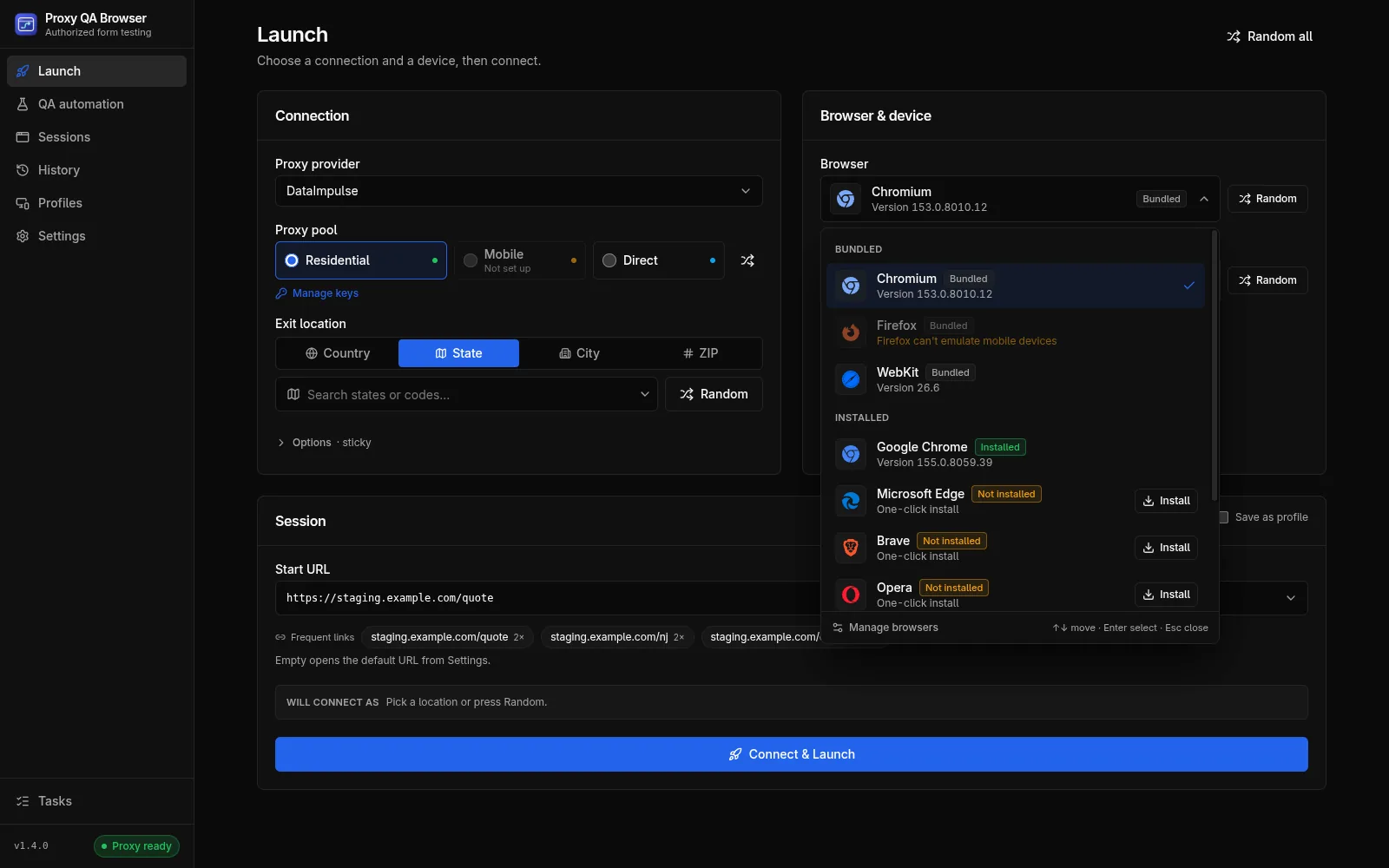
Bundled engines and installed browsers
Chromium, Firefox and WebKit are bundled; their versions follow the bundled Playwright release, listed under supported browsers and versions. Installed browsers are Chromium-family only: Google Chrome, Microsoft Edge, Brave, Opera, Opera GX (Windows and macOS) and system Chromium. They are the real browsers, started with their own executable, and identify as themselves.
WebKit on Windows and Linux
WebKit is the open-source engine Safari is built on, labelled "WebKit / Safari-compatible QA" in the app. It runs on Windows, Linux and macOS and catches WebKit-specific layout and behaviour issues, but it is not Apple Safari.
Install missing browsers from the app
A missing browser offers Install or Get right in the browser list, and each install is verified with a headless test launch. Detection never starts a browser to find it.
- Linux: the vendor's official package, unpacked into the app's folder without root
- Windows: a silent winget install; Chrome installs machine-wide and may show a UAC prompt
- macOS: Get opens the vendor's download page, and the app finds the browser once you drag it into Applications
Run the same scenario in every engine
In QA automation, a matrix runs one recorded scenario across up to 10 engines, capped at 100 cases per matrix by default (configurable up to 500), and exports JSON, JUnit or HTML reports. Run it against your own staging site with synthetic data.
Combine engines with devices and locations
Phones and tablets run on WebKit and Chromium-family browsers, never on Firefox; see device presets per engine. With your own proxy plan, you can also test each browser from a chosen US location.
Known limits
Stated plainly, from the known browser limitations:
- Vivaldi installs and is detected, but launches fail: Vivaldi 8.2 hangs under automation
- Opera GX has no Linux build
- Firefox cannot emulate phones or tablets
- WebKit on Linux needs glibc 2.38 or newer
How it works.
Every step and setting is covered in the documentation linked below.
Read the docsOpen the browser list
On the Launch page, the browser field lists bundled engines first, then installed browsers with their status and version.
Install what is missing
Click Install or Get next to a missing browser. Installs run one at a time as background tasks.
Pick a device and launch
Choose a compatible device preset, Direct or your own proxy pool, and click Connect & Launch.
Compare the runs
History lists each launch with its engine and device; open a run for its screenshot and HTTP status.
Automate the matrix
Record the flow once in QA automation, run it across engines and devices, then export the report.
Common questions.
Is WebKit the same as Safari?
No. WebKit is the open-source engine Safari is built on, driven by Playwright and labelled "WebKit / Safari-compatible QA" in the app. It catches WebKit-specific layout and behaviour issues, but it does not replace testing in Apple Safari when that matters.
Can I test WebKit on Windows?
Yes. The app downloads a native Windows build of WebKit, the engine Safari is built on, during first-run setup or later from Settings. It is not Safari itself. Platform differences
Which browsers run in CI?
The runner Docker image, which the GitHub Action uses, contains Chromium, Firefox and WebKit. Installed vendor browsers such as Chrome, Edge and Brave are not included. The image is published for linux/amd64. Docker image
Try it on your own site.
Free and open source, for Windows, Linux and macOS. Use it on sites you own or are contracted to test.