
Proxy providers
Bring your own plan from a supported proxy provider: logins, location targeting by provider and sticky or rotating sessions. Not affiliated with any provider.
Last updated
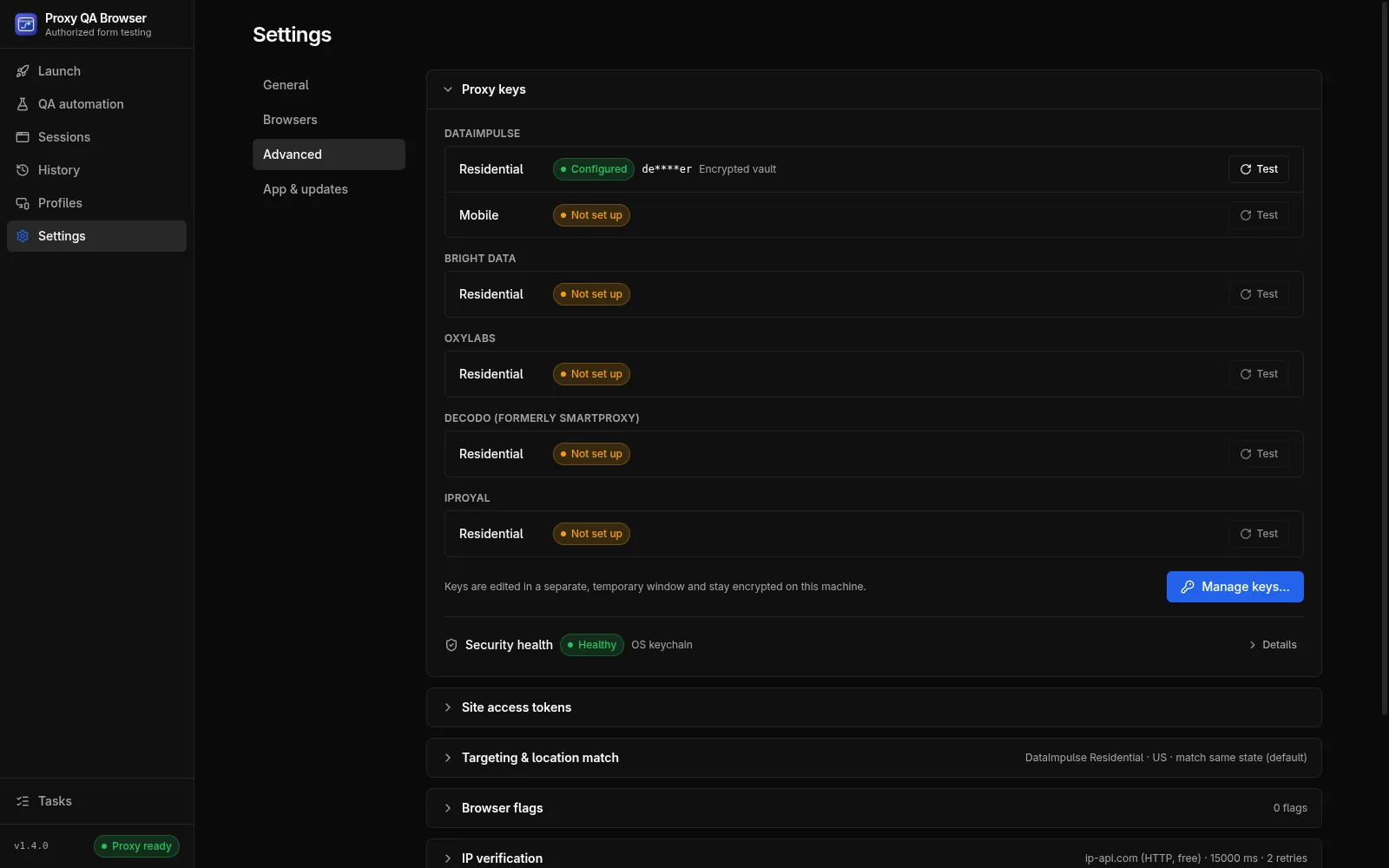
Proxy QA Browser builds each provider's login and targeting parameters for you, with DataImpulse live-tested and Bright Data, Oxylabs, Decodo and IPRoyal community-verified. The app does not sell or include proxies: each user brings their own plan, and targeting depends on the provider (IPRoyal has no ZIP mode). The project is not affiliated with or endorsed by any proxy provider.
Built-in providers
Providers are built into the app; no plug-ins are loaded at runtime, because a provider sees your credentials. Each provider declares its products (plans), target modes, sticky-session rules, default gateway and any extra credential fields, and the Launch page, profile editor, keys window and Settings are built from that.
| Provider | Products | Default gateway | Targeting (US) | Sticky session / TTL | Verification |
|---|---|---|---|---|---|
| DataImpulse | Residential, Mobile | gw.dataimpulse.com:823 |
Country, State, City, ZIP | sessid + sessttl (1–1440 min) |
Live-tested |
| Bright Data | Residential | brd.superproxy.io:44445 |
Country, State, City, ZIP | -session-<id>; no TTL parameter (a session ends after 5 idle minutes) |
Community-verified |
| Oxylabs | Residential | pr.oxylabs.io:7777 |
Country, State (Oxylabs' 50-state list, no DC), City, ZIP | -sessid-<id> + -sesstime-<1–1440> |
Community-verified |
| Decodo (formerly Smartproxy) | Residential | gate.decodo.com:7000 |
Country, State, City, ZIP | -session-<id> + -sessionduration-<1–1440> |
Community-verified |
| IPRoyal | Residential | geo.iproyal.com:12321 |
Country, State, City (no ZIP: not documented by IPRoyal) | _session-<8 characters> + _lifetime-<N>m (up to 7 days) |
Community-verified |
Note: Community-verified providers were written from each provider's official parameter documentation and have not been tested with a live account. The provider pickers label them (community-verified) and the keys window says "Community-verified (not tested with a live account)". If a gateway refuses a parameter, check the provider documentation linked from the keys window and open an issue with the redacted error.
Profiles, quick launches, CLI runs, proxy sessions and run history record which provider they used. Records created before providers were selectable are DataImpulse records.
Pools, logins and billing
The app stores one login per provider product. A product without a login is shown as Not set up and cannot be used. Direct uses no proxy at all.
- DataImpulse sells Residential and Mobile as separate plans, each with its own login, on the same gateway. A Residential login is never used for the Mobile pool.
- Each user needs their own plan with the provider. Usage is billed by the provider to that plan. See how to run location tests with your proxy plan.
- DataImpulse bills state, city and ZIP targeting at 2× and country-only targeting at the normal rate; the launcher warns about it. The community-verified providers document no targeting surcharge, so no billing note is shown for them.
- Every exit-IP check and every location re-roll is one small HTTP request through the proxy.
DataImpulse username syntax
Parameters are appended to the login after a double underscore: __ starts the list, ; separates parameters and . separates key and value.
login__cr.us;state.newjersey;city.newark;zip.07102;sessid.ql-20261007-7f3a;sessttl.60| Key | Meaning | Sent when |
|---|---|---|
cr |
Country, lower-case ISO-2 | Always with a target (required with state, city and zip) |
state |
US state name, encoded | State, City and ZIP targets |
city |
City name, encoded | City and ZIP targets |
zip |
5-digit ZIP code | ZIP targets |
sessid |
Sticky session ID; keeps the same exit IP | Sticky sessions |
sessttl |
Sticky lifetime in minutes (1–1440) | Sticky sessions with a TTL |
- The order is always
cr,state,city,zip, then any other parameters your saved login already carries, thensessid,sessttl. - If your saved login already contains parameters (for example
mylogin__cr.us), itscr,state,cityandzipare replaced by the launch's target, other parameters are kept, and itssessidandsessttlare replaced in sticky mode. - The Will connect as preview, the session and the run store only the parameter part (
cr.us;…). The login and password are added inside the app's main process when the connection is built and are never shown or stored in plain text.
Place name encoding
Accents and punctuation are removed, the text is lower-cased and & becomes and. Words are then joined according to Settings → Advanced → Targeting & location match → Place name encoding:
| Option | Example |
|---|---|
| Remove spaces (DataImpulse default) | newjersey, stlouis, winstonsalem |
| Replace spaces with underscores | new_jersey |
| Keep spaces | new jersey |
Keep the default unless DataImpulse tells you otherwise; its published state list uses the remove-spaces form.
Sticky session template
The sessid part is added through a template. The default is {username}{sep}sessid.{session}, where {username} is the login with its parameters, {session} is the session ID and {sep} is ; when the login already contains __, otherwise __. You can save a different template with a product's credentials under Advanced: sticky session template; it must contain {username} and {session}. sessttl is appended after the template. Only DataImpulse supports templates.
Community-verified providers in detail
| Provider | Where parameters go | Example parameters |
|---|---|---|
| Bright Data | Username: the zone username (brd-customer-EXAMPLE-zone-EXAMPLE) plus parameters |
-country-us, -state-nj (USPS code), -city-newark, -city-newark-zip-07102 |
| Oxylabs | Username: customer-<user> plus parameters |
-cc-US, -st-us_new_jersey, -cc-US-city-newark, -cc-US-postalcode-07102 |
| Decodo | Username: user-<user> plus parameters |
-country-us, -state-us_new_jersey, -state-…-city-newark, -zip-07102 |
| IPRoyal | Password: <password> plus parameters; the username is sent unchanged |
_country-us_state-newjersey, _city-newark |
These providers accept only certain sticky session IDs (letters and digits only; IPRoyal exactly 8 characters). The app maps your session ID to a deterministic alphanumeric token, so a profile ID such as profile-qa-1 is sent in a form the provider accepts and stays the same across launches. State and ZIP targeting for these providers is accepted only for United States targets.
Sticky and rotating sessions
Use sticky for multi-step forms: one exit IP is kept for the session TTL (about 30 minutes by default with DataImpulse; Bright Data ends a session after 5 idle minutes). Rotating may use a different exit IP for every request.
| Mode | Behaviour |
|---|---|
| Sticky (default) | A session ID pins one exit IP for about 30 minutes (DataImpulse default) or for Session TTL minutes. Quick launches generate a fresh ID per launch, ql-<YYYYMMDD>-<4 random characters>. Saved profiles use their Sticky session ID; a sticky profile without one gets profile-<name> generated and saved on first use |
| Rotating (Sticky session off) | No session ID or TTL is sent; every request may use a different exit IP |
Rotate under Settings → Advanced → Proxy session history appends -r2, -r3, … to a profile's ID. That is a new sticky session, normally with a new exit IP, and the app tests it at once.
Before the browser opens, the app verifies the exit IP and, for sticky sessions with a target, can re-roll the session, up to the Attempts limit, until the location meets your match policy. See Exit-IP verification.
Custom gateways (QA automation)
QA automation can also use a gateway of any other provider. In QA automation → Data controls → Custom proxy gateways, save an HTTP or HTTPS gateway (with optional username and password) or an unauthenticated SOCKS5 gateway, then select it in a scenario. It overrides the base profile's proxy and target.
- Credentials are encrypted with the operating system keychain; unsupported Linux keychain backends are refused.
- WebKit requires an HTTP gateway.
- Provider-specific location and sticky parameters are not applied. Put the other provider's targeting syntax in the username if needed.
Custom gateways are for automation only; manual launches use the built-in providers. See Scenarios and matrices.
Adding a provider
Providers are added in code, one dialect file per provider, with a golden-table test taken from the provider's documented examples. See Contributing.