
Settings reference
Reference for every Proxy QA Browser setting: where it lives, its default and allowed range, QA automation policy limits and environment variables.
Last updated
Every desktop setting, where to find it, its default and what it does, plus the QA automation policy and the environment variables the headless tools read.
Where settings live
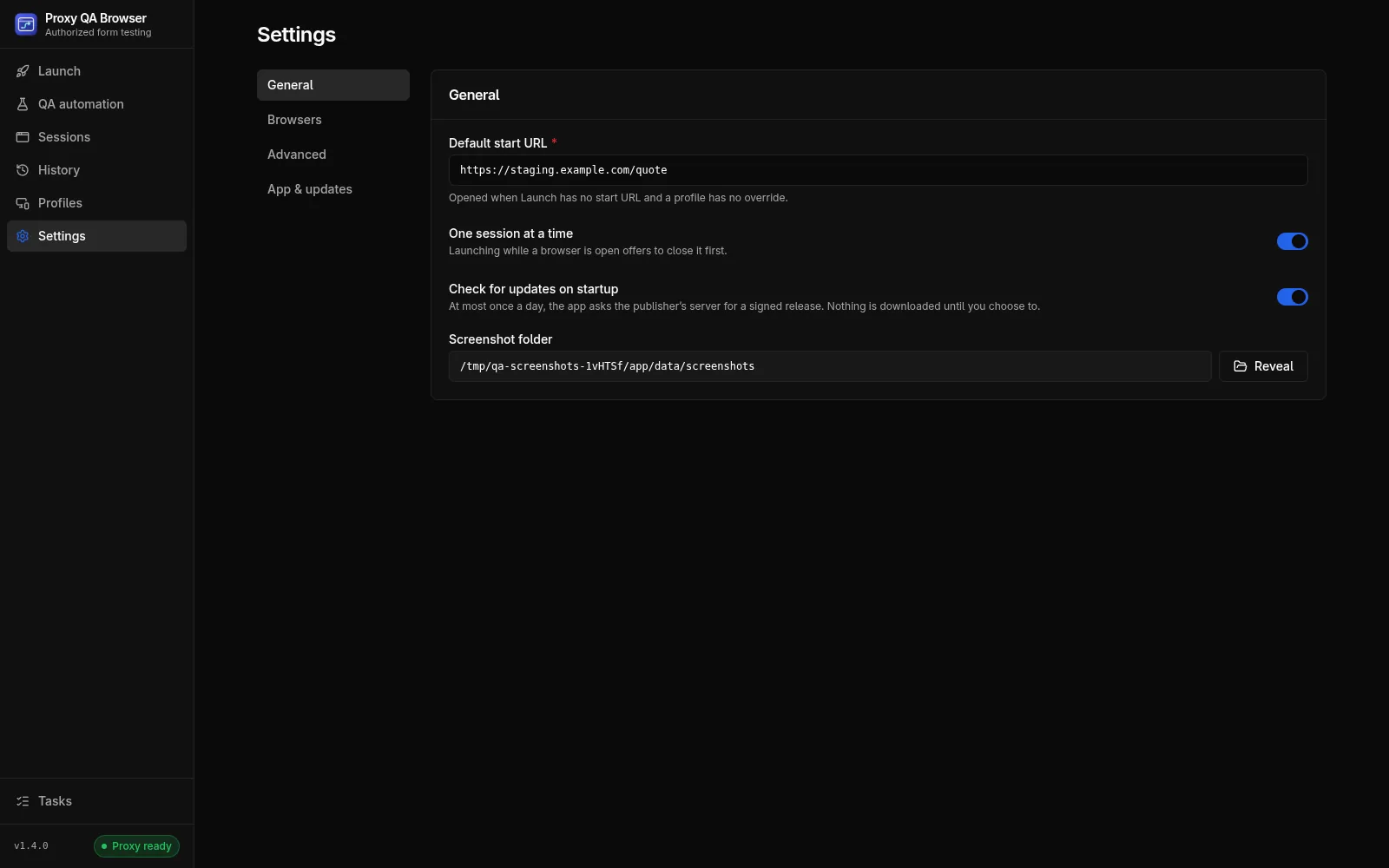
Settings has four tabs: General, Browsers, Advanced and App & updates. Each setting lives in exactly one place. Changes on General and Advanced are saved together from the Save Changes bar that appears while something is unsaved; Reset discards them. An invalid value opens its tab and section and gets the focus.
Advanced has collapsible sections; only Proxy keys is open by default. A link such as /settings/advanced#logs opens a section directly. Section IDs: proxy-keys, site-access, targeting, browser-flags, ip-verification, network-inspector, proxy-sessions and logs.
Settings are stored in the local database and validated on load, key by key, so one corrupt value falls back to its default without discarding the others. Proxy credentials are not settings: they live in the encrypted vault.
Application settings
| Key | Where / label | Default | Meaning |
|---|---|---|---|
defaultFormUrl |
General → Default start URL | https://example.com/ |
Opened when Launch has no start URL and a profile has no form URL override. http(s) only |
singleSessionMode |
General → One session at a time | on | Only one browser session may be open; Launch offers Close it and launch |
checkUpdatesOnStartup |
General → Check for updates on startup | on | One background check of the signed update feed after start, at most once per 24 hours; never downloads |
screenshotDir |
General → Screenshot folder (read-only) | <userData>/data/screenshots |
Where screenshots are written |
browserExecutables |
Browsers → row … → Set custom path | none | Executable path per installed browser, yours or saved automatically |
browserExecutableOrigins |
Browsers (chips custom / auto) | none | Who set each path: user (never overwritten while the file exists) or auto (dropped when the file disappears) |
defaultProviderId |
Advanced → Targeting & location match → Default proxy provider | dataimpulse |
Provider pre-selected on Launch and for new profiles; provider of raw gateway tests |
defaultProxyPool |
Advanced → Targeting & location match → Default proxy pool | residential |
Product of the default provider pre-selected on Launch |
defaultTargetCountry |
Advanced → Targeting & location match → Default country | us |
Two-letter country pre-filled on Launch |
providerOptions |
Advanced → Targeting & location match → Place name encoding | each provider's default | Per-provider options. encoding is how multi-word places are written (DataImpulse: remove-spaces, underscore, keep). See Place name encoding |
locationMatchPolicy |
Advanced → Targeting & location match → Location match | state (Same state) |
off, state or exact. See Location match policy |
locationMatchAttempts |
Advanced → Targeting & location match → Attempts | 3 |
Total IP checks for the policy, first check included (1–8) |
extraChromiumArgs |
Advanced → Browser flags → Extra Chromium flags | none | Extra command-line flags (--flag or --flag=value, one per line) for every Chromium-family launch; Firefox and WebKit ignore them |
ipCheckProvider |
Advanced → IP verification → Provider | ip-api |
ip-api, ipinfo or ipwhois. See IP-check services |
ipCheckTimeoutMs |
Advanced → IP verification → Timeout (ms) | 15000 |
1,000–120,000 |
ipCheckRetries |
Advanced → IP verification → Retries | 2 |
0–5 retries on the selected service |
networkInspectorEnabled |
Advanced → Network inspector → Capture requests and extract lead / certificate ids | on | Record requests and extract IDs on the run page |
navigationTimeoutMs |
Advanced → Network inspector → Navigation timeout (ms) | 60000 |
5,000–300,000; how long opening the start URL may take |
Other Advanced sections
These sections hold data and tools rather than settings:
| Section | Contents |
|---|---|
| Proxy keys | One row per provider product with Configured / Not set up, masked username, source (Encrypted vault or Development .env), last test and Test. Manage keys… opens the Manage keys window. Security health is described in Security and privacy |
| Site access tokens | Your allowlisting headers. See Site access tokens |
| Proxy session history | Every proxy session row with profile, session ID, status, IP, location, ISP, latency, last check and error, with Test and Rotate |
| Logs | The live log with level and scope filters, search, Auto-scroll and Clear Logs |
App & updates
Computer setup and shortcuts, Online updates, Update from USB and release notes (see Updates); then the version, build type, platform and Playwright version; Locations of user data, data, key and vault with reveal buttons; and Attribution.
Profile fields
Saved profiles have their own settings: viewport (320–7680 × 320–4320 px), user agent, locale, timezone, proxy mode, provider, pool, sticky session ID (letters, digits, - and _, up to 64), target location, sticky TTL (1–1440 minutes), form URL override and notes. See Profiles.
QA automation policy
Set under QA automation → Data controls. See Data controls.
| Setting | Range | Default |
|---|---|---|
| Evidence retention | 1–3,650 days | 30 |
| Maximum cases per matrix | 1–500 | 100 |
| Concurrent automated browsers | 1–4 | 2 |
| Daily case-attempt budget | 1–10,000 | 500 |
| Allow raw traces | on / off | off |
Per-scenario settings in the scenario editor:
| Setting | Range | Default |
|---|---|---|
| Step timeout | 1,000–60,000 ms | 15,000 ms |
| Approved origins | 1–30 origins | The starting URL's origin |
| Screenshot mask selectors | up to 30 | none (inputs and [data-qa-sensitive] are always masked) |
| Self-healing | off, warn, fail | warn |
| Follow redirects within approved sites | on / off | on |
| Network throttling | none, slow-3g, fast-3g, 4g |
none |
| Capture Playwright trace | on / off (needs the policy permission) | off |
Environment variables
Packaged desktop builds read no .env file and no proxy variables. The variables below apply to development builds, the CLI runner and the MCP server.
| Variable | Used by | Purpose |
|---|---|---|
QA_PROVIDER, QA_PROVIDER_PRODUCT, QA_PROVIDER_HOST, QA_PROVIDER_PORT, QA_PROVIDER_USERNAME, QA_PROVIDER_PASSWORD, QA_PROVIDER_EXTRA_<KEY> |
CLI, MCP, development app | Login of one provider product. See CI runner |
DATAIMPULSE_PROXY_HOST, DATAIMPULSE_PROXY_PORT, DATAIMPULSE_PROXY_USERNAME, DATAIMPULSE_PROXY_PASSWORD |
CLI, MCP, development app | Alias of QA_PROVIDER=dataimpulse |
QA_PROXY_SERVER, QA_PROXY_USERNAME, QA_PROXY_PASSWORD |
CLI, MCP | One custom gateway for the whole run |
QA_MCP_ALLOWED_ORIGINS, QA_MCP_WORKSPACE, QA_MCP_MAX_CASES, QA_MCP_CONCURRENCY, QA_MCP_DAILY_BUDGET |
MCP | See MCP server policy settings |
DATAIMPULSE_SESSION_TEMPLATE |
Any build | Default sticky-session template; a template saved with credentials wins |
PLAYWRIGHT_BROWSERS_PATH |
Any build | Override the browser engines directory |
PROXY_QA_DEFAULT_FORM_URL |
Any build | Default start URL while none has been saved in Settings |
ELECTRON_RUN_AS_NODE |
Any build | Must be unset for the desktop window to open. See Install |
Build and release variables (signing, update feed, publisher keys) are listed in Building and releasing.